
Is this website genuine? How to check a web address
Scammers can copy a website's logo and colours, but they can't copy its address. Learn how to read a web address, and use a free tool to check a website before you trust it.
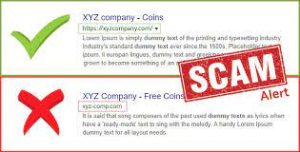
Scammers are very good at making fake websites that look exactly like the real thing – the same logo, the same colours, the same layout. The one thing they can't copy is the web address. Learning to read it is one of the best ways to protect yourself.
Finding the part that matters
A web address (sometimes called a URL) looks something like this:
www.gov.uk/renew-driving-licence (opens in a new tab)
The important part is the end of the name, before the first single slash ( / ). That tells you who the website belongs to. Anything after the slash points to a page on that website.
Government and NHS websites:
- Genuine government websites always end in .gov.uk – for example www.gov.uk (opens in a new tab), www.westsussex.gov.uk (opens in a new tab) and www.midsussex.gov.uk (opens in a new tab).
- Genuine NHS websites end in .nhs.uk (and NHS emails often come from nhs.net).
Companies: The company's name should come right before the ending (.co.uk, .com, .org.uk and so on) – for example amazon.co.uk or royalmail.com.
Spot the fake
- apply-provisional-driving-licence.service.gov.uk – ✅ Genuine. Extra words in front are fine, because it still ends in .gov.uk.
- www.gov.driving-licence.**renew.co.uk (opens in a new tab)** – ❌ Fake. It belongs to "renew.co.uk". Putting "gov" at the start is a trick.
- www.**amazon-refunds-uk.com (opens in a new tab)** – ❌ Fake. The name before .com is "amazon-refunds-uk", not Amazon.
- royalmail.redelivery-fee.com – ❌ Fake. It belongs to "redelivery-fee.com".
The same rule works for email addresses. Look at everything after the @ sign. An email from DisneyPlus@costumercontact.com comes from "costumercontact.com" – not Disney.
Addresses scammers like to copy
- gov.uk (and council websites ending in .gov.uk)
- nhs.uk and nhs.net
- amazon.co.uk
- royalmail.com and parcelforce.com
- evri.com
- dpd.co.uk
Watch out for adverts in search results
When you search for something like "renew driving licence" or "apply for passport", the top results are often adverts marked Sponsored. Some of these are companies that charge you for something that is free or cheaper on the official website. Scroll past the adverts and look for the .gov.uk address.
Check a website before you trust it
Get Safe Online has a free tool called Check a Website. Type in the web address and it runs a series of checks, then tells you whether the site is likely to be genuine.
www.getsafeonline.org/checkawebsite (opens in a new tab)
It's worth using when:
- you're shopping somewhere for the first time
- you've been sent a link you weren't expecting
- a link doesn't look familiar
For example, some hospitals send appointment letters through a service called Patients Know Best (patientsknowbest.com). It's genuine, but it's not the name you'd expect – a quick check gives you peace of mind.
The safest habit of all
If an email or text message asks you to click a link, don't. Go to the website yourself – type in the address, use a bookmark, or open the organisation's official app.
Think you've been scammed?
- Contact your bank straight away, or call 159 to reach your bank's fraud team.
- Report it to Report Fraud (which replaced Action Fraud in December 2025): reportfraud.police.uk or 0300 123 2040.
- Forward scam emails to report@phishing.gov.uk
- Forward scam texts to 7726 – it's free, and goes to your mobile network.
- For support, contact Victim Support: www.victimsupport.org.uk (opens in a new tab) or 08 08 16 89 111.
Please don't feel embarrassed – scammers are professionals who fool people every day. Reporting helps stop them.
Need a hand?
Not sure whether something is a scam? Bring it along and we'll check it with you. Our friendly volunteers can help at our free sessions:
- Mondays 10am–12noon – St Wilfrid's Church Hall, Burgess Hill
- Thursdays 10am–12noon – Spire Café, St John's Church, Burgess Hill
- Haywards Heath – Bentswood @ No.34, America Lane (by appointment)
Call 07349 916841 or email spire.computer.help@gmail.com. No question is too small.
The Spire Computer Help Team
More hints and tips on this topic
Explanations of the words you might meet, in our glossary: Internet & Browsing, Scams & Online Safety.